
Download Thiran
PDF markup and takeoff for construction. Try every feature free for 7 days, with no card needed.
Version 0.17.8 · 28 October 2026
On a phone or another computer? Use Thiran in your browser at my.thiran.app.
What you need
Windows
Windows 10 or Windows 11, 64-bit.
Mac
macOS 13 Ventura or later, on a Mac with Apple Silicon or Intel.
Both
An internet connection to sign in and to check your licence the first time.
Or use it in your browser
Nothing to install. Sign in at my.thiran.app with the same account.
Install in a few easy steps.
Installing on Windows
Windows shows a blue warning the first time, because Thiran is a new app that isn't signed yet. That's expected. Here's how to get past it.
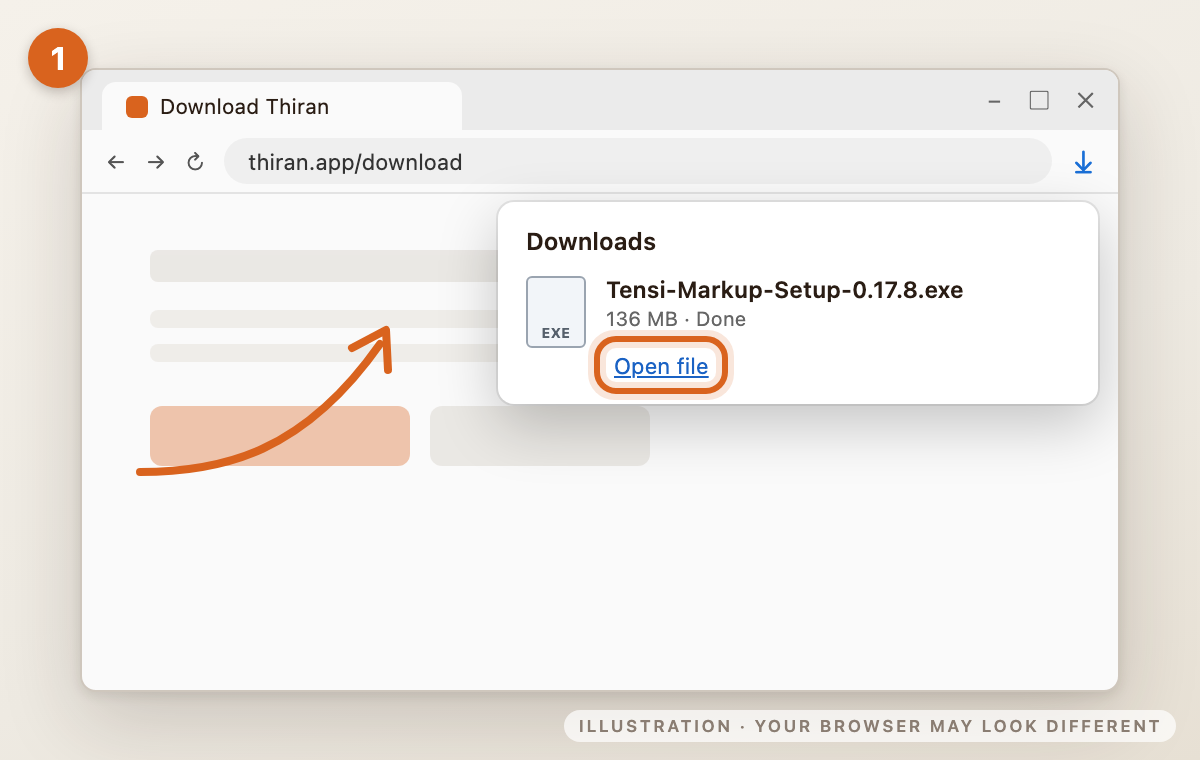
1Open the download
When the download finishes, click Open file in your browser's downloads. The file is called Tensi-Markup-Setup-0.17.8.exe.
Some browsers first say the file "isn't commonly downloaded". If yours does, choose Keep.
2"Windows protected your PC"
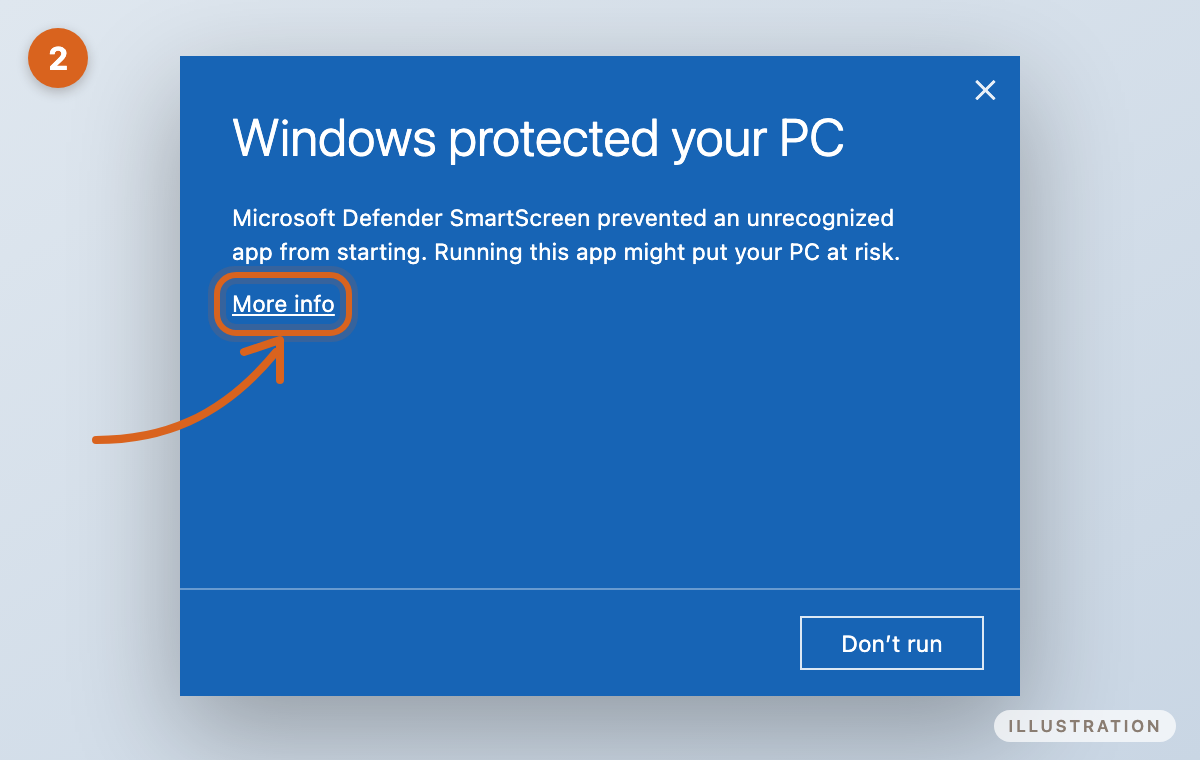
Windows may show a blue box that says Windows protected your PC. This is Microsoft Defender SmartScreen, and it appears for new apps that aren't signed yet. Click More info.
3Run anyway
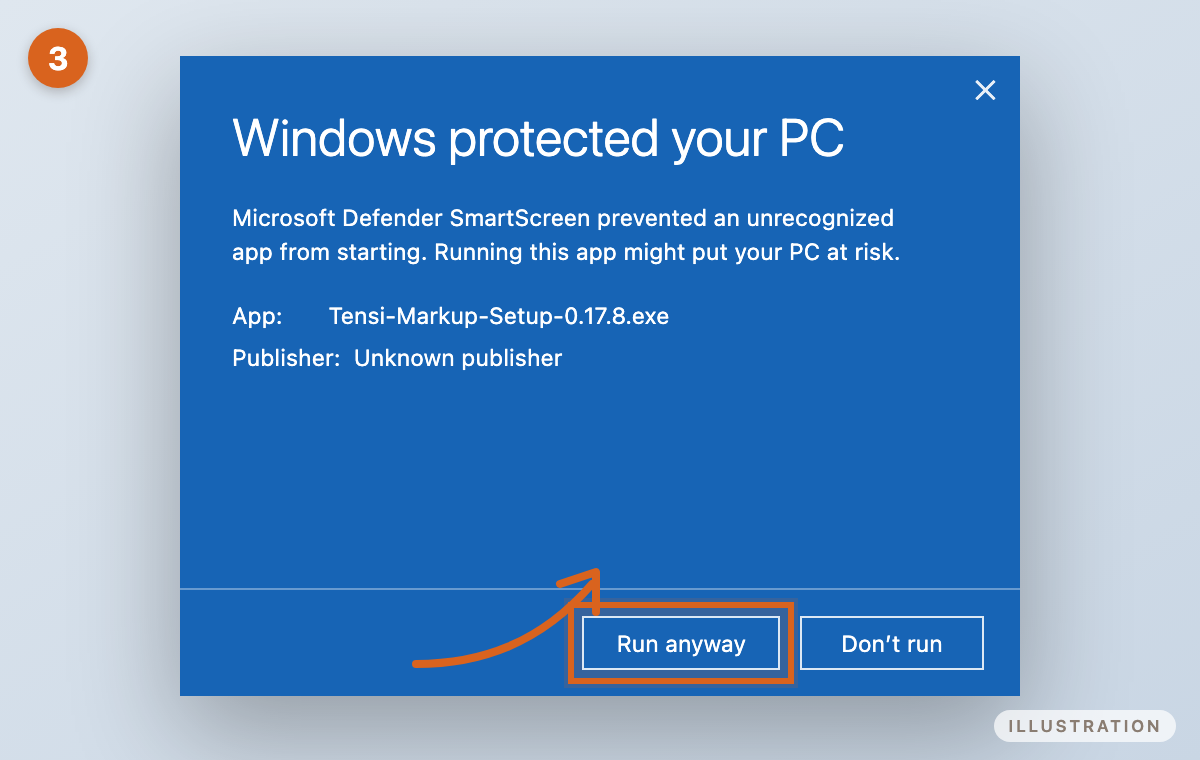
You'll see App: Tensi-Markup-Setup-0.17.8.exe and Publisher: Unknown publisher. Click Run anyway.
4Install
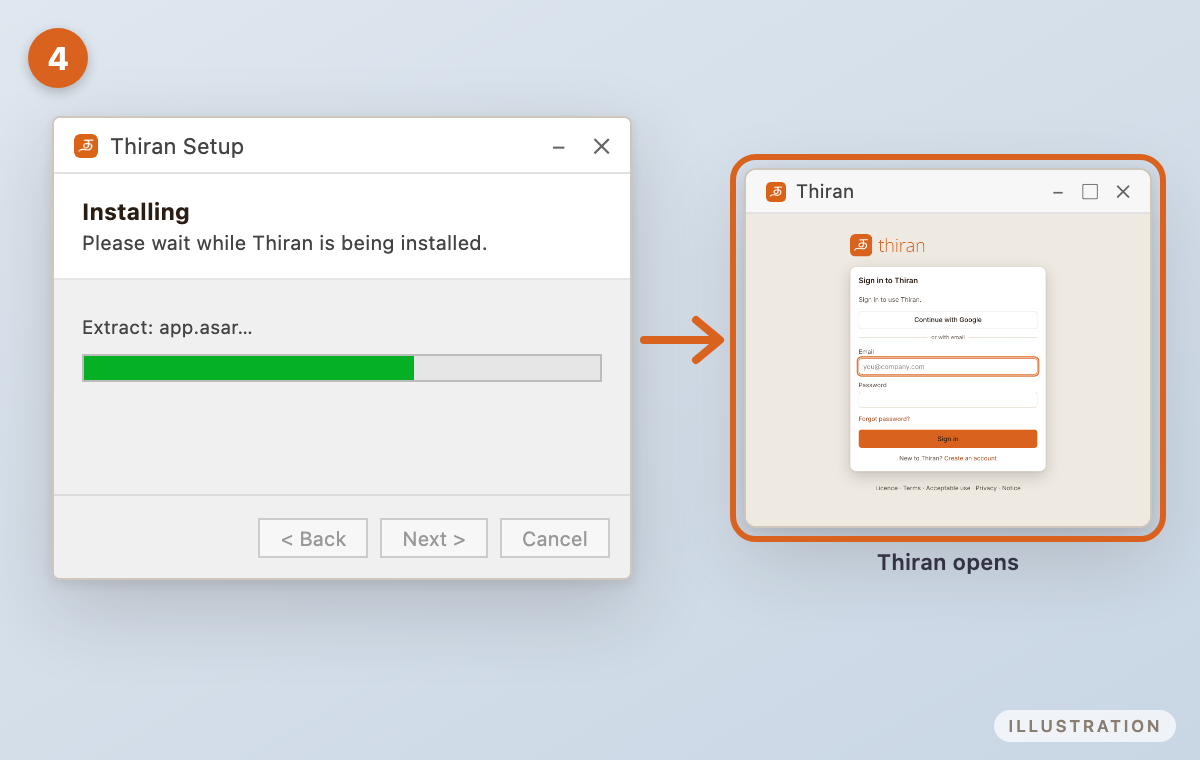
Follow the Thiran Setup steps. You can install just for you, without administrator rights.
Setup may ask whether to add the Thiran PDF printer, which lets any program print straight into Thiran. This is optional, and adding it needs administrator permission.
When setup finishes, Thiran opens. You'll find it in the Start menu and on your desktop.
Installing on Mac
macOS asks you to allow Thiran once, because it's a new app that Apple hasn't checked (notarised) yet. It takes about a minute, and you only do it once on each Mac.
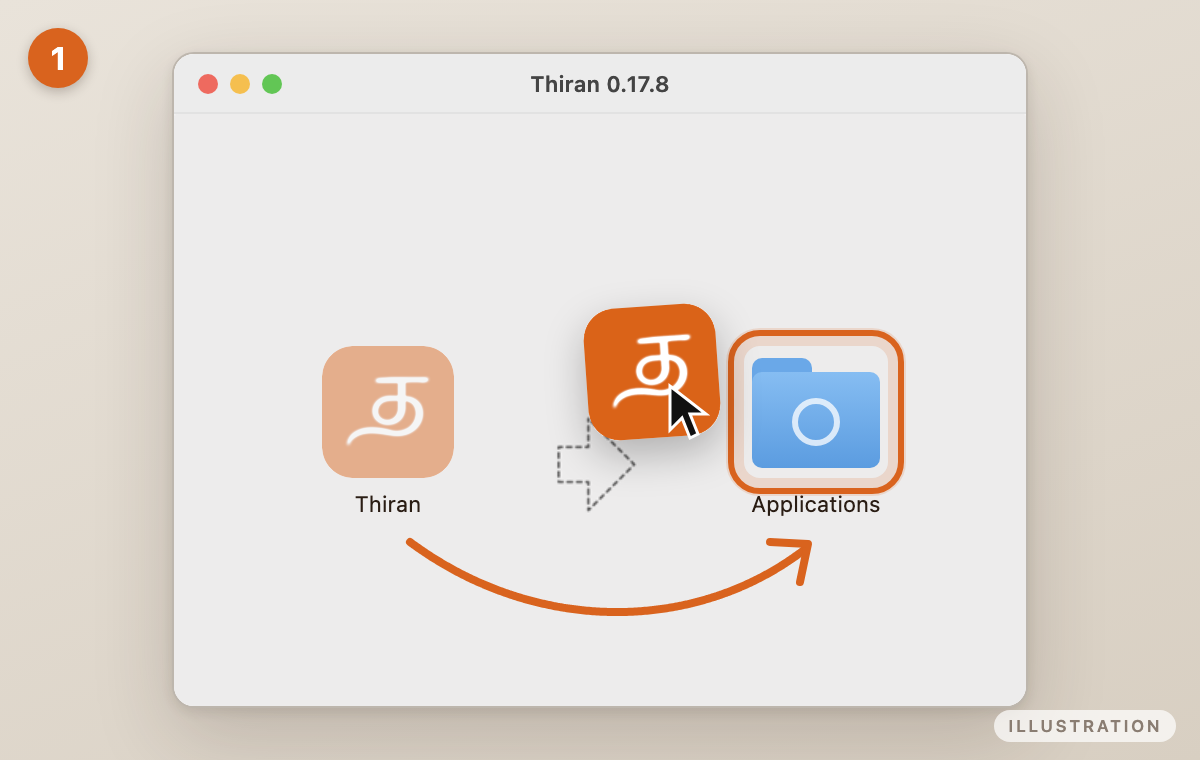
1Drag Thiran into Applications
Open Tensi-Markup-0.17.8-mac-universal.dmg. A window called Thiran 0.17.8 opens. Drag Thiran onto Applications.
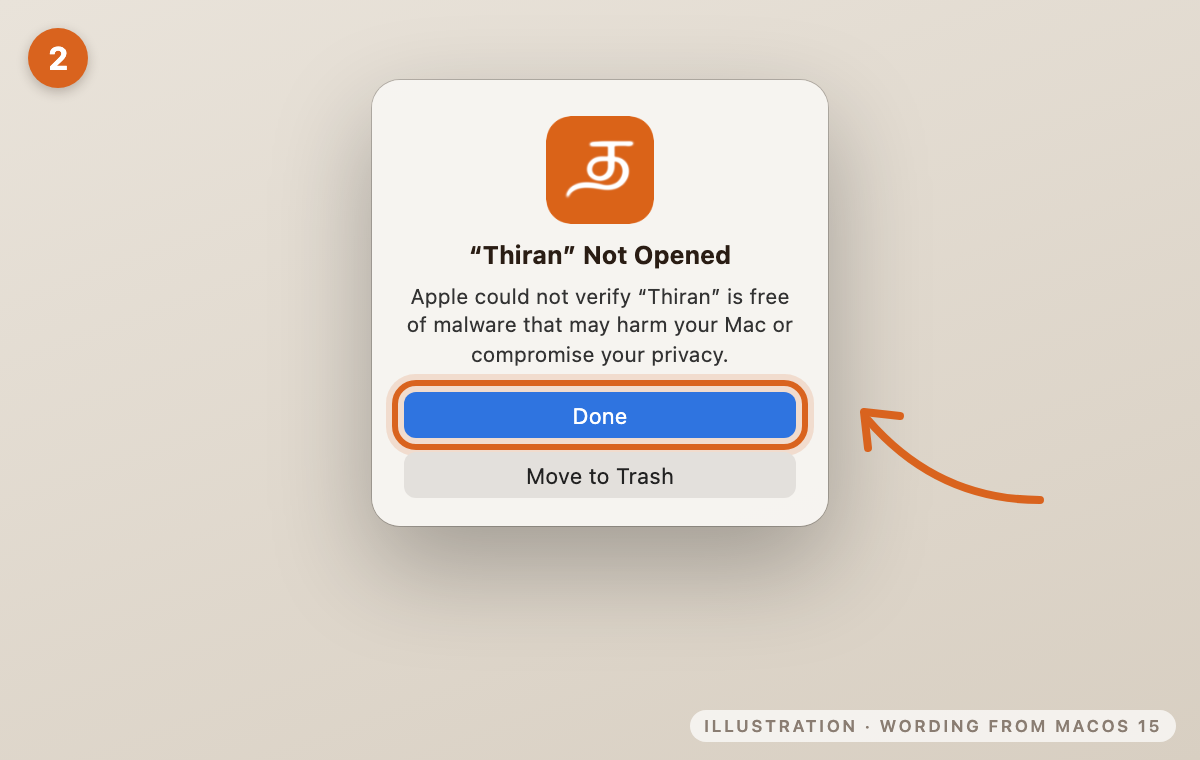
2Open Thiran, then click Done
Open Thiran from your Applications folder. macOS says "Thiran" Not Opened and Apple could not verify "Thiran" is free of malware that may harm your Mac or compromise your privacy. This is normal for an app that isn't notarised yet. Click Done. Don't choose Move to Trash.
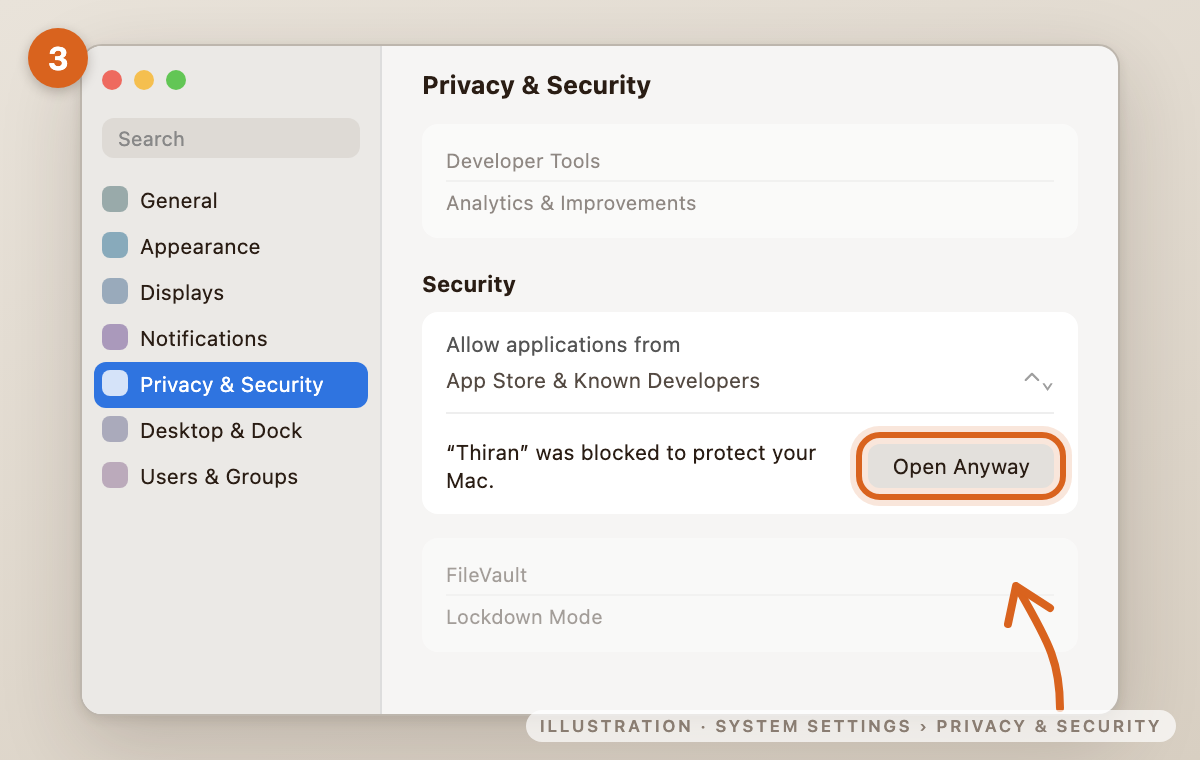
3Allow it in System Settings
Open System Settings › Privacy & Security. Scroll down to Security, find "Thiran" was blocked to protect your Mac., and click Open Anyway.
The button shows for about an hour after you try to open the app. If you don't see it, open Thiran again and come back.
4Confirm
macOS asks once more. Click Open Anyway, then confirm with your Mac password or Touch ID. Thiran opens, and from now on it opens normally.
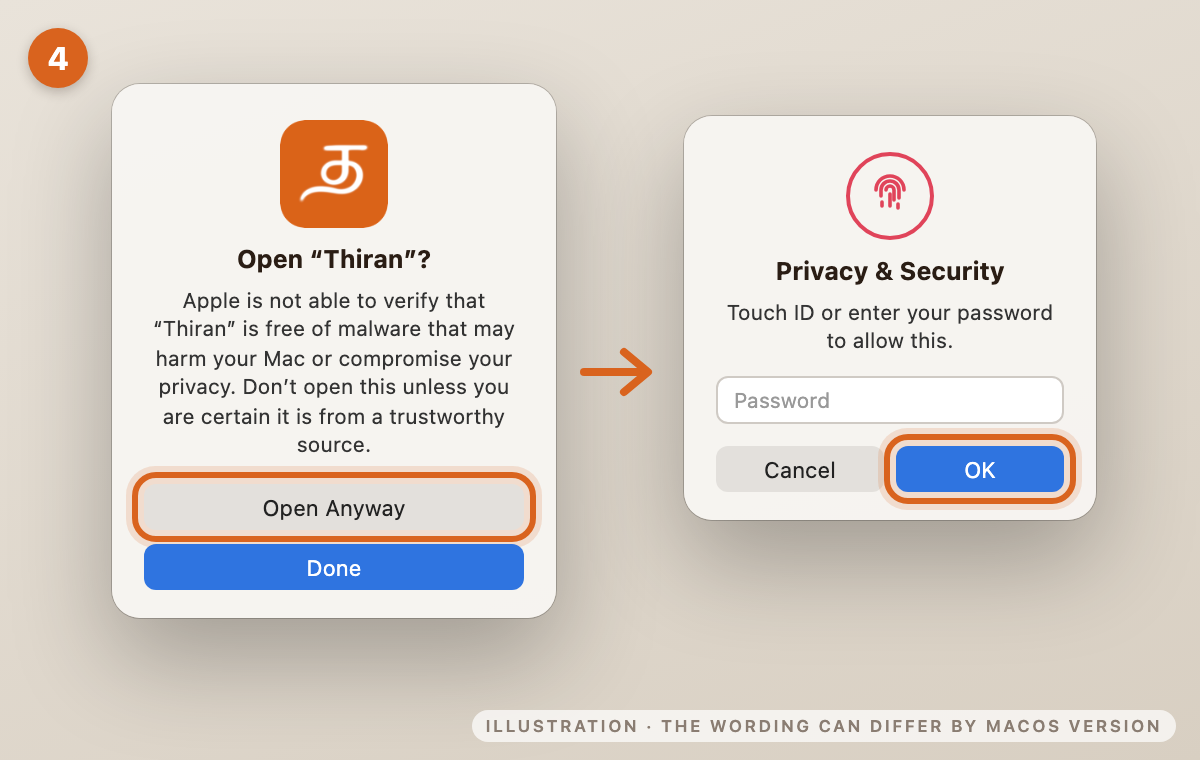
Older macOS: on macOS 13 or 14 the wording is a little different ("can't be opened because Apple cannot check it for malicious software"), but the steps are the same: click OK, then open System Settings › Privacy & Security and click Open Anyway.
Your first start
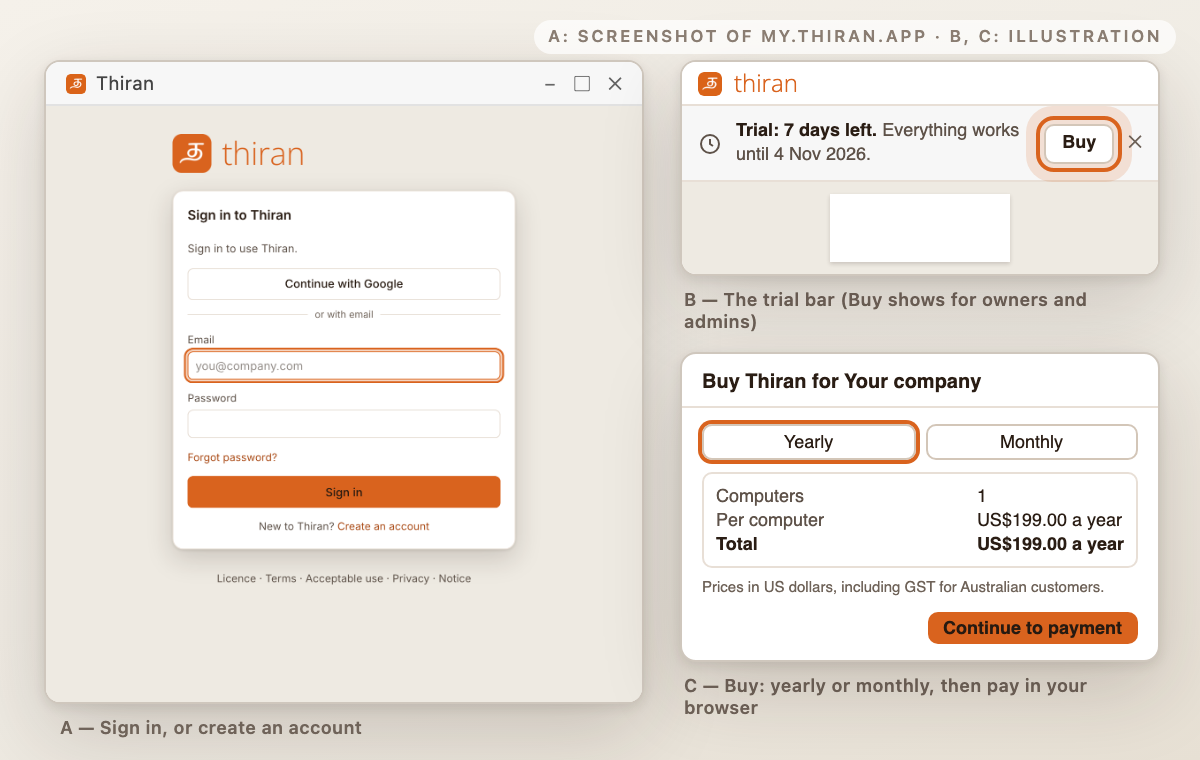
- Sign in, or create an account. Use Continue with Google, or your email and a password. New to Thiran? Click Create an account, and confirm your email address when asked.
- Thiran checks the licence for this computer. This needs an internet connection the first time.
- Your 7-day free trial.
- A new account gets 7 days of the full version: every feature, with no card needed.
- The bar at the top shows Trial: N days left.
- The 7 days start the first time you use Thiran.
- There is one trial per person and per computer.
- After the trial. Your drawings and markups are all kept, and you can still view and download them. You need a licence to edit.
- Buying (owners and admins of your organisation):
- Click Buy in the trial bar, or open Help › Licence and devices › Billing.
- Choose Yearly or Monthly and the number of computers, then click Continue to payment. Payment opens in your browser.
- Back in Thiran, your licence is picked up within a few moments.
- Other members of your organisation should ask their owner or an admin for a licence.
- Prices. In US dollars. GST is included for Australian customers, and nothing is added on top.
US$199 per computer per yearUS$19.90 per computer per monthBuying 6 or more computers gives a volume discount on each one, up to 20% off. This is optional; the app shows the exact price.
- Manage billing (in the same place) lets you change the plan, the number of computers or the card, and see your invoices.
Updates
Windows
Thiran updates itself. It downloads new versions in the background and shows Restart to update. If you don't restart, the update installs the next time you close Thiran.
Mac
For now, you install a new version yourself. Download it from this page and drag it into Applications again, replacing the old one. Your account and work aren't affected.
Is it safe?
Why the warning?
Thiran is a new app. Windows and macOS show these warnings for apps whose installers aren't yet signed (Windows) or notarised by Apple (Mac). The warning means the system couldn't check the app, not that it found anything wrong. We're working on signing.
Check your download (optional)
Each file has a SHA-256 fingerprint. If yours matches, you have exactly the file we published.
Windows Tensi-Markup-Setup-0.17.8.exe
501ae05a30dae743a5bc69d31831e336edc7e637d76d909dc8b3e35e6400b516To check on Windows, run this in PowerShell:
Get-FileHash .\Tensi-Markup-Setup-0.17.8.exe
Mac Tensi-Markup-0.17.8-mac-universal.dmg
9bfe9b7690b4984dc5d1d5351ba17d4314ab628fd0959bc2909834ee6e9cbd22To check on Mac, run this in Terminal:
shasum -a 256 ~/Downloads/Tensi-Markup-0.17.8-mac-universal.dmg
Scanned with VirusTotal: Windows results · Mac results
Need a hand?
Stuck, or something looks different from these pictures? Email us at we@tensi.ai and we'll help.